kldload 1.3.1 — The Kernel-Loaded Desktop
1.3.1 is the workstation release. The expert operations kldload has always shipped — ZFS boot environments, a KVM hypervisor on instant zvol clones, a real Kubernetes cluster, the eBPF cockpit — are now point-and-shoot desktop apps. Each web tool opens as its own chromeless window with the correct dock icon, not a browser tab. It looks like a stock RHEL 10 workstation; the datacenter is one click behind the familiar chrome.
Underneath, the substrate got harder to break. CentOS Stream and Rocky moved to EL10 to match RHEL 10, retiring the EL9 (5.14) path that wedged dracut and NVIDIA on first boot. The kernel, OpenZFS, and NVIDIA driver are versionlocked at first boot, so a routine dnf update can never jump the kernel and brick ZFS-on-root.
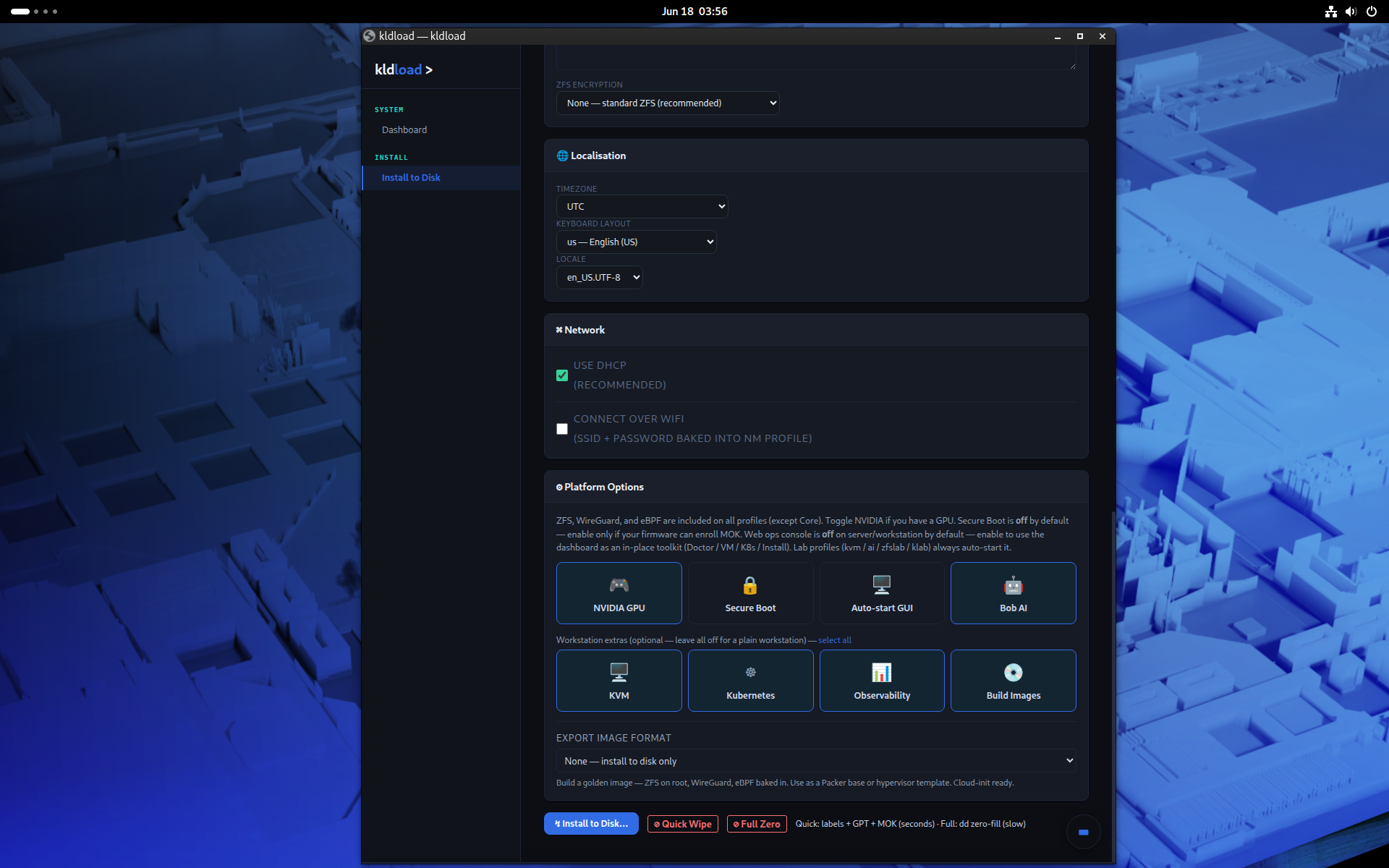
1. Compose your own workstation
No fixed "editions." The installer presents capability toggles above the Install button — pick exactly what you want and it's built for you. Same reproducible substrate underneath every combination.
KVM
Full libvirt virtualization host (virbr0 + br0), kvm-create / kvm-snap / kvm-clone on ZFS zvols.
Kubernetes
A real multi-node cluster (control-plane + workers) on ZFS instant-clone VMs — Cilium, Hubble, Tetragon.
klab
Multi-distro golden images (CentOS / Debian / Fedora / Rocky / Ubuntu) + blue-green lab on instant clones.
AI (Bob)
Local GPU-resident LLM assistant (Ollama, qwen3), offline — no data leaves the box.
Observability
Prometheus / Grafana / Tetragon plus the eBPF cockpit (sysdiag), embedded in the :8443 web UI.
ZFS lab & WireGuard
OpenZFS module dev lab, NFS/iSCSI exports, and a microsegmented 4-plane WireGuard mesh.
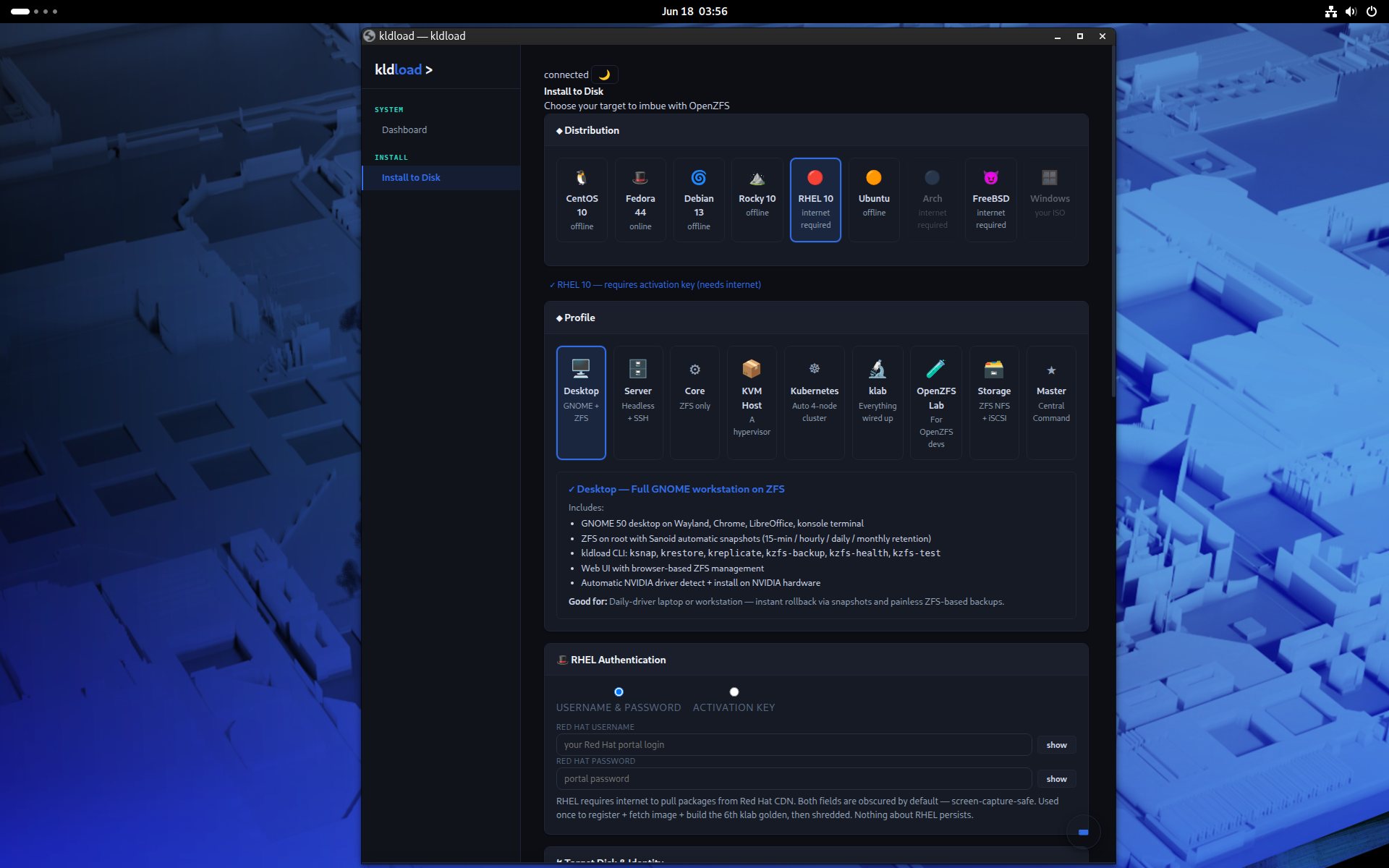
2. Workstation — the GUI layer
GUI-first RHEL 10 workstation: expert ops (ZFS / KVM / K8s / eBPF) as point-and-shoot desktop apps.
- Native per-tool app windows (chromeless GTK/WebKit) — each web tool opens as its own window with the correct dock icon (Chrome app-mode + Wayland
app_idmatched), not a browser tab. - NVIDIA + Wayland render fixes —
GSK_RENDERER=nglpre-baked; firstboot reloads running user sessions so the fix lands without a re-login (no first-session Nautilus segfault). - Console (the tmux cockpit) promoted to its own application, de-duplicated from every tool window; VM serial console embedded in the web UI via the ttyd-k9s session.
- RHEL 10 desktop package + TLS fixes (ptyxis, zenity, glib-networking); Steam (Flathub), nvidia-settings, and gvim as default workstation apps.
- Refined icon set, hotrodded RHEL 10 wallpaper, dock pinned to Files / Firefox / Konsole on installed systems (empty on the live ISO so the installer is the focus).
3. VM restore-on-reboot
Running VMs come back automatically after a reboot; stopped VMs stay stopped. The hypervisor remembers what was up and brings it back — no manual virsh start across a host reboot, no surprise auto-start of something you'd deliberately shut down.
4. Substrate & distro parity
- CentOS Stream + Rocky now on EL10 (kernel 6.12, OpenZFS 2.3) matching RHEL 10 — retires the EL9 (5.14) path that wedged dracut/NVIDIA on first boot.
- Live env corrected to Fedora 44 kernel 7.0.12 / OpenZFS 2.4.3 (the old 6.19 pin is gone; ZFS 2.4.3 builds against the GA 7.0 kernel).
- Substrate versionlocked at first boot (kernel, kernel-devel, zfs/zfs-dkms, nvidia + akmod-nvidia, bcc/bpftrace) so
dnf updatecan't jump the kernel and brick ZFS/NVIDIA. 5 rescue kernels kept;dnf-automaticmasked. - KVM / Kubernetes / lab profiles now warn they need hardware virtualization (VT-x / AMD-V or nested virt) before you commit to the install.
- NVIDIA proprietary via signed akmod (Secure-Boot-capable) with a first-boot healing net that builds + loads the driver for correct native resolution.
5. Full Stack Automation — the install-time layer
The automation work once tracked as 1.2.0 ships here: a click in the web UI spawns a full microservices workload, every dashboard lights up, and recovery is one button.
- Spring PetClinic Microservices + ArgoCD wired into autodeploy — seven services that light up L7 Hubble and the Cilium service map.
- sanoid / syncoid on by default with sensible policies (5-minute snapshots on the workload, hourly on
/srv, daily on the OS); boot environments before every package transaction. - Web UI Demo Mode — deploy / trigger-disaster / recover buttons, snapshot inventory, replication lag, ArgoCD sync state. Gated by
KLDLOAD_DEMO_MODE=1. - State & reconciliation layer under
/var/lib/kldload/state/— one declarative YAML owns apps, ingress, and monitoring. - Deterministic install ordering (control plane → workers → Cilium → observability → Tetragon → klab) — failure modes are now obvious instead of "something fell over in the first ten seconds."
- Installer auto-generates and bakes an admin SSH key into every install — nodes are peer-reachable out of the box.
6. Reliability & ops
- Critical-package verify gate — the install fails loud if the package manager, kernel, NetworkManager, GDM or GNOME shell didn't land (no silent
--skip-brokenshipping a broken system). - firstboot fail-loud (
set -Eeuo pipefail+ ERR trap — every failure logs its exact line and command) plus healing nets (Chrome, NVIDIA, desktop essentials) that recover any package the install couldn't land. - Every install pass verified against the rpm db, not assumed.
7. Substrate & distros
One USB, ZFS-on-root, across Fedora 44 (primary) / RHEL 10 / Rocky 10 / CentOS Stream 10 / Debian 13 / Ubuntu / Arch, plus the Windows klab guest and the BSD posture. Reproducible offline install — Fedora and RHEL fully air-gapped from a build-time darksite. After install the system runs upstream packages from the vendor's public repos: there is no kldload package repository and no kldload-specific runtime updates — dnf update / apt upgrade / pacman -Syu just work.