| what if Linux was different?
your platform, your way, free
Source

What if Linux was different?

You don’t install it — you deploy it: point at any distribution and stamp out disposable, reliable clones, from the first package to a 100% running estate on first boot. What if Linux went from batteries not included to batteries included?! That fragmented mess you used to glue together with a wall of vendors? Vanished — poof.

None of it is new. Google, Amazon, the hyperscalers have run on exactly this kind of kernel-level power for decades — it’s how you operate at planetary scale. They built that power for themselves — dedicated hardware, their own fleets, never for sale. This isn’t a claim to do it better than they do; it’s the same proven playbook, set up for Linux and made general-purpose — on the hardware you already own, for anyone. Unix greybeards have known it for forty years. The only reason nobody ever sold it to you is that there’s nothing to sell: you can’t productize the kernel. The invoices all live up in userland — and userland just went obsolete.

An ordinary, quiet desktop — nothing obviously going on The same machine running ZFS-backed VMs, live eBPF tracing, Grafana, a local GPU AI, and Steam all at once
Same machine, moments apart. Left: an ordinary desktop. Right: ZFS-backed VMs, live kernel tracing, a Grafana cockpit, a local GPU AI — and Counter-Strike — all at once.
What if storage worked completely differently?
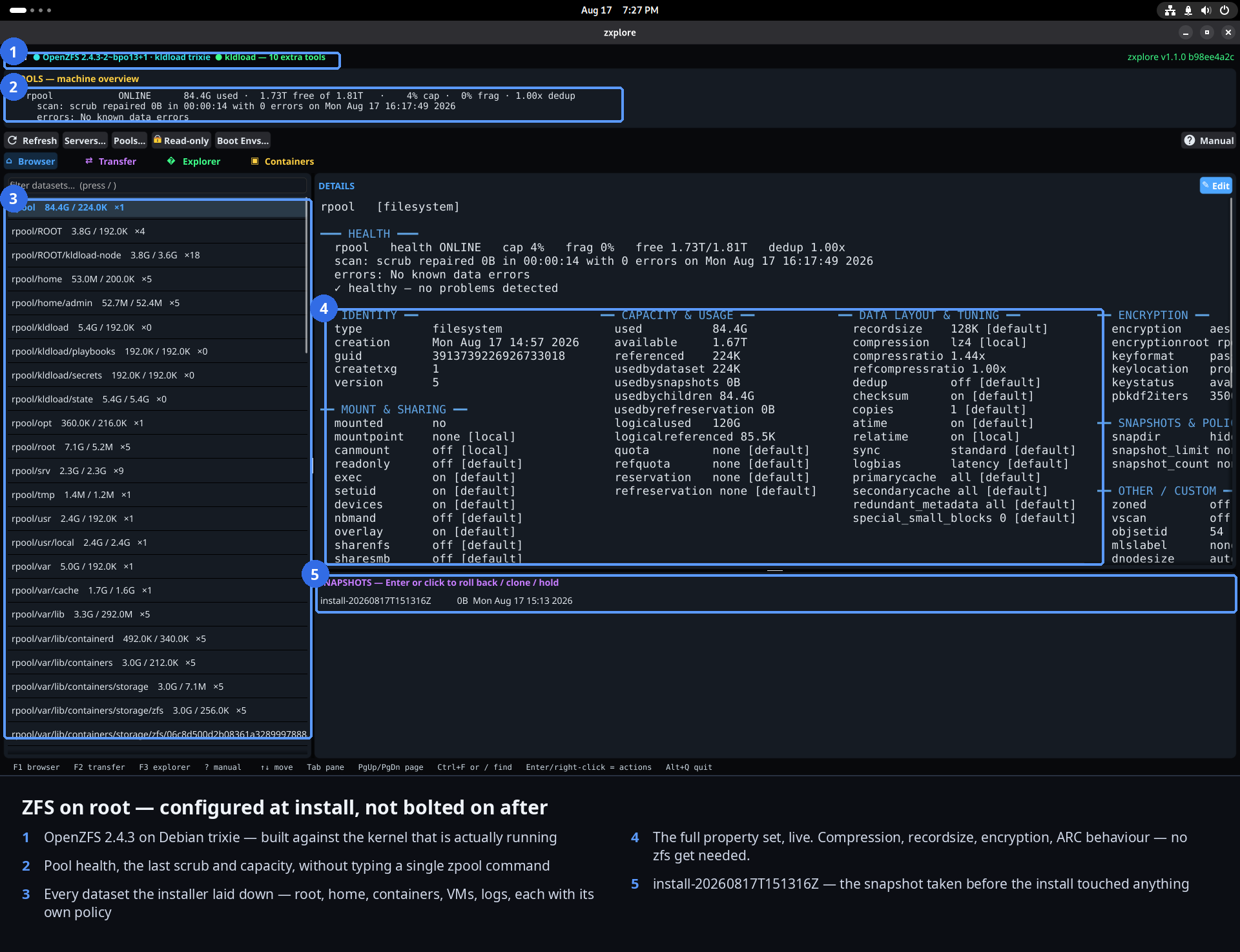
It’s OpenZFS on root — one integrated system that fuses the volume manager, the RAID controller, the filesystem, the cache, compression, and end-to-end checksums into a single thing. Your whole disk becomes a 128-bit data lake where every VM, container, home directory, and backup is just a dataset — snapshot, clone, replicate, or roll it back in an instant.

Remember everything you used to assemble just to have storage? Volume managers. Partition tables. One block device sliced into fixed-size pieces that never quite fit — guessed wrong, then resized later with your fingers crossed. Formatting, mount tables, the works. What if all that fluff simply… vanished? There’s no partitioning and no resizing — a dataset just takes what it needs. Want to cap it, or guarantee it room? You set a quota or a reservation and move on. Storage stops being a layer cake you build and becomes a natural part of the system. Presto — the whole partition-table yuck is gone.

Suppose a botched upgrade left no scar.

Roll back in fifteen seconds.

Every update quietly snapshots the whole system first. Bad kernel? Pick yesterday at the boot menu, reboot — you were never broken. No reinstall, no rescue USB.

Ransomware, quietly defanged.

Redeploy fifteen minutes into the past.

The snapshots are read-only — ransomware can’t touch them. Roll the machine back to a clean moment and boot it. Your data returns exactly as it was. The attack becomes an inconvenience.

Every directory, promoted to a first-class object.

Snapshot, replicate, roll back — your stuff.

It is a dataset. Snapshot it before a risky change. Replicate it to another machine in one shot. Roll it back to this morning.

A 500 GB clone? Free? Here’s how.

Copy a database in milliseconds.

Copy-on-write clones share every block until you change one. Stand up a full copy of production instantly, using zero extra space until it diverges.

fsck? Bah — to hell with that.

The filesystem is never inconsistent.

Every write is atomic. A power failure can’t leave you with half-written garbage — you have the old data or the new data, always. The pool imports in seconds. No journal replay, no multi-hour scan.

Bit-rot, ruled out by arithmetic.

Every block checksummed and self-healed.

Silent corruption is detected on every read and repaired from a good copy automatically, before your app ever sees it. The lie a hard drive tells gets caught.

Backups that never became a purchase order.

It’s just snapshots on the wire.

No agent, no second storage tier, no vendor. Incremental replication to a peer or a second pool, on whatever schedule you set. Backup was always just how the filesystem works.

ZFS on root — not ZFS bolted on as an afterthought.

Every node is a member, not a client.

Run ZFS as an appliance and you get one big pool that fifty machines reach into over NFS or SMB, gated by ACLs — a destination you connect to. On root, each of those fifty is a native ZFS node: no server to mount, datasets replicating peer-to-peer across the mesh, and membership in the mesh already is the access layer. Same disks, same data — shared natively between peers, not exported through a gateway. Neither is “wrong” — it’s the right tool for the job. But on root, you already have it.

A network that manages itself.
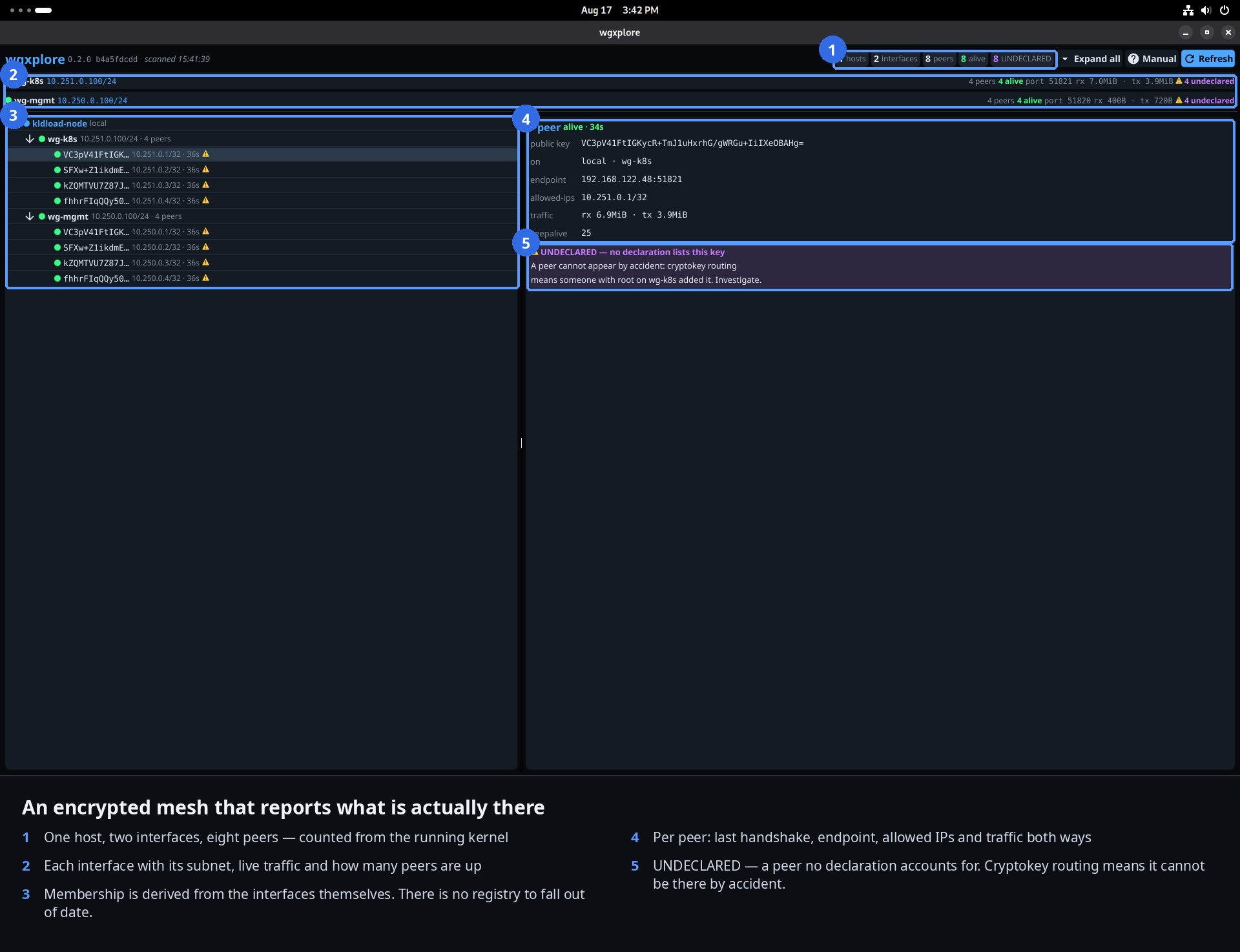
It’s an in-kernel WireGuard mesh, on by default — encrypted, point-to-point networking treated as required, not optional. No DNS, no hostnames, no IPs to wrangle, no vendor appliance in the middle. The underlay is already plumbed; you just use it.

Think about the machinery a network used to demand. VPN concentrators. DNS servers and hostnames to keep straight. Static IPs assigned by spreadsheet. Firewall rules three teams argued over. VLANs, bastion hosts, port-forwards, the load-balancer appliance with the yearly license. Now picture none of it. WireGuard lives in the kernel — there’s no daemon to run and babysit the way OpenVPN or IPsec make you, and encryption isn’t a mode you switch on, it’s the only way the machines talk. The single requirement is one reachable endpoint — a host or gateway the others can dial — and the mesh forms itself behind it, NAT and all. Machines find each other by identity, every byte between them stays yours, and the whole network sits on a private plane the public internet can’t even see. You don’t run this network. You build on top of it.

Hosts that need no introduction.

No DNS. No hostnames. No IPs.

Pure in-kernel point-to-point. Open a couple of ports and your hosts connect by identity, not address. Think Tailscale — but for servers, and built in.

Encryption as the resting state, not a project.

You never “set up a VPN” again.

Encryption isn’t a thing you configure — it’s just how the machines talk. Every byte between hosts, private, from the first boot.

A new site? One line does it.

Join the mesh with a public key.

Adding a location, a laptop, a cloud box — one command and a key. The mesh reshapes itself. No hub appliance, no ticket to networking.

What if the kernel itself did the routing?

Service routing without iptables.

Cilium’s eBPF datapath does load-balancing and policy in the kernel — kube-proxy is gone, and there are no iptables rules to debug at 3 a.m.

The network, finally rendered legible.

Every flow, drawn as a live map.

Hubble renders L3–L7 flows in real time — who talked to whom, what was allowed, what was dropped. The network stops being a black box.

Why rent an identity provider?

The mesh is the access layer.

You own the network, the keys, and the apps making the calls — and your services sit on a private mesh the public internet can’t even see. Access by membership, not by subscription. The gatekeeper you were paying is a middleman for something you already hold — you don’t log into your own house.

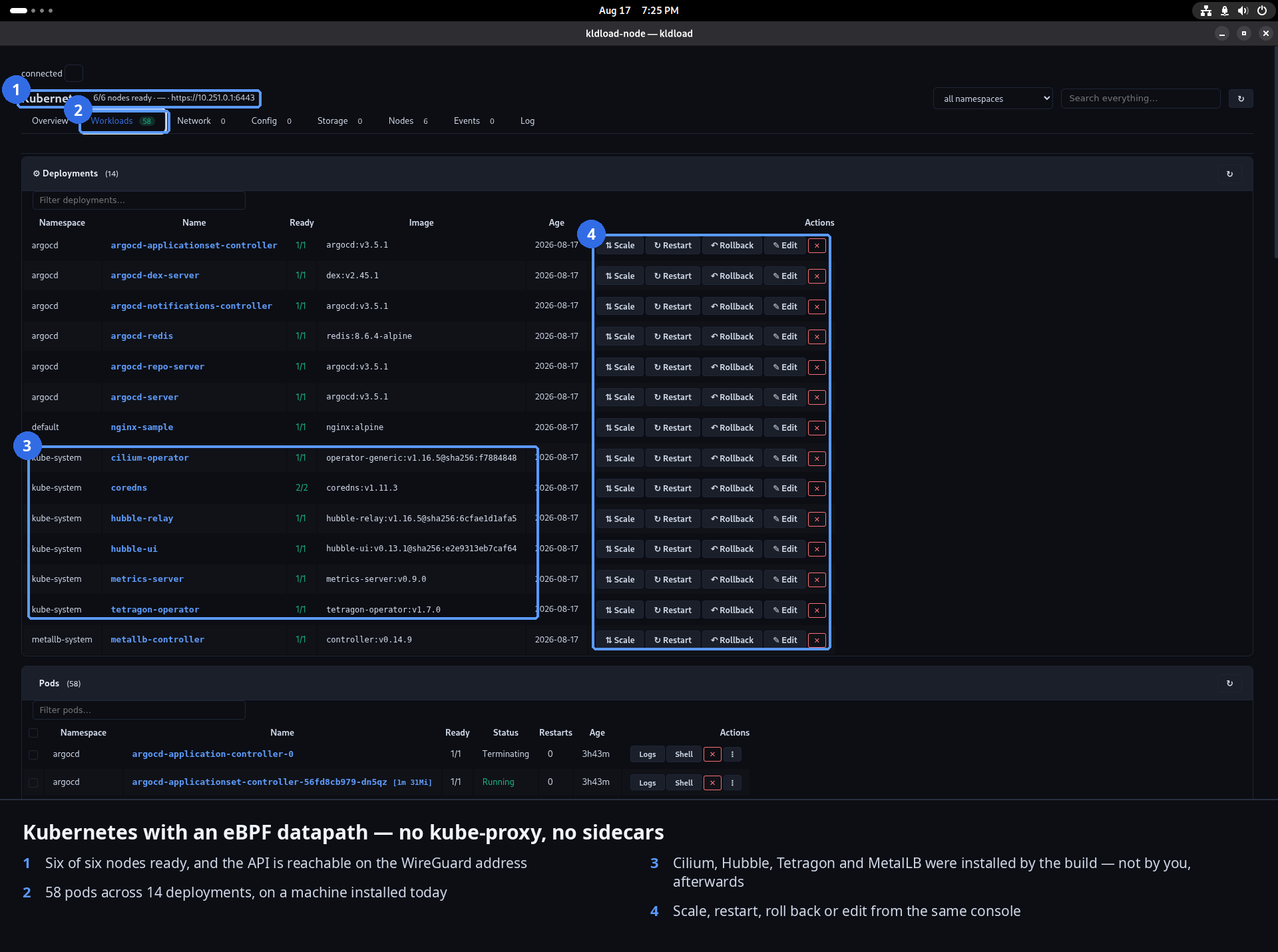
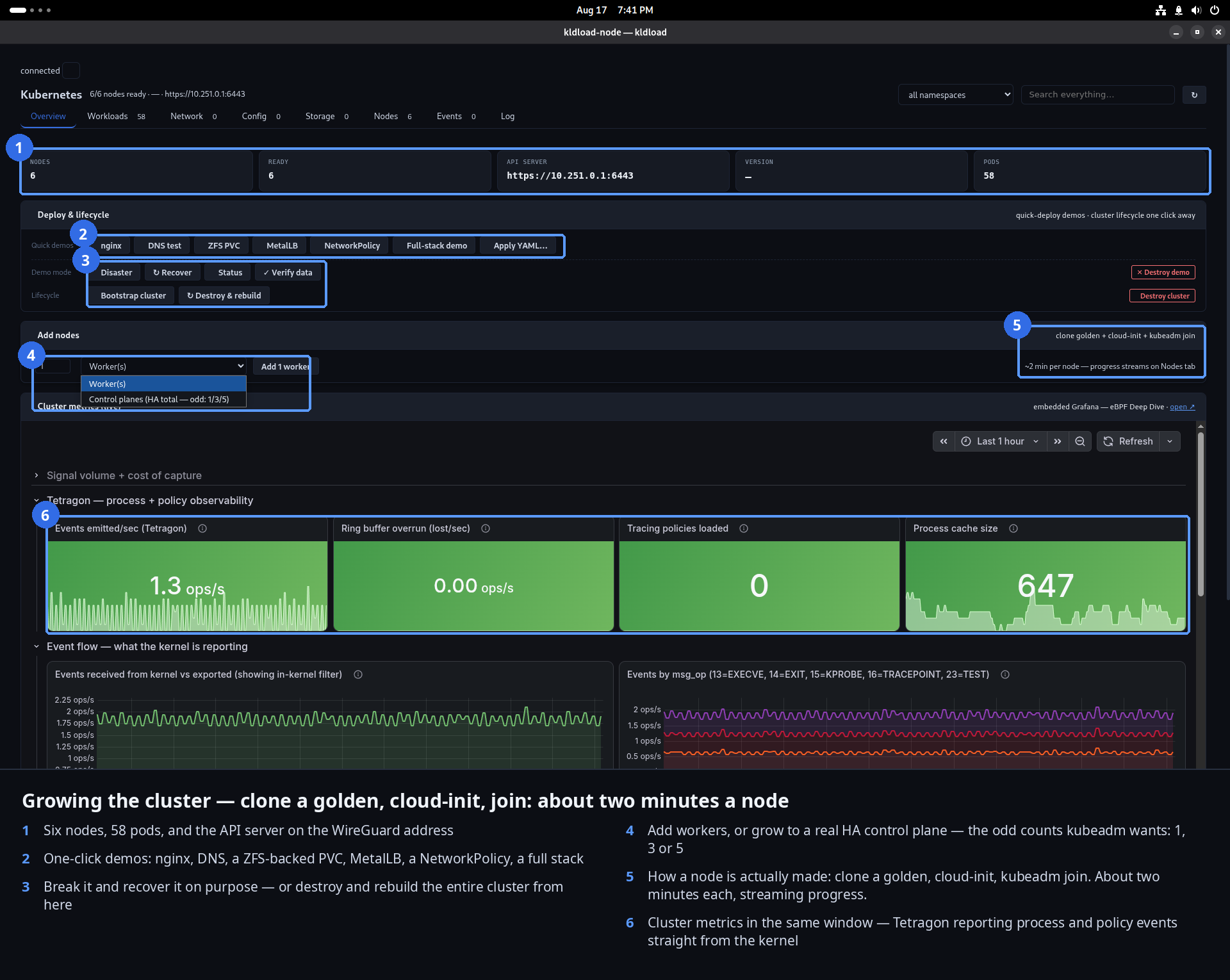
A whole cluster, wired for you?

Push a button — it’s on its own WireGuard backplane.

Spin up a Kubernetes cluster and every node comes up on its own dedicated, encrypted WireGuard mesh — keyed and wired for you. No CNI yak-shaving, no overlay to configure. Encrypted node-to-node isn’t a hardening step you bolt on later — it’s the default the plumbing was already built for. Presto.

Nothing hides from you.
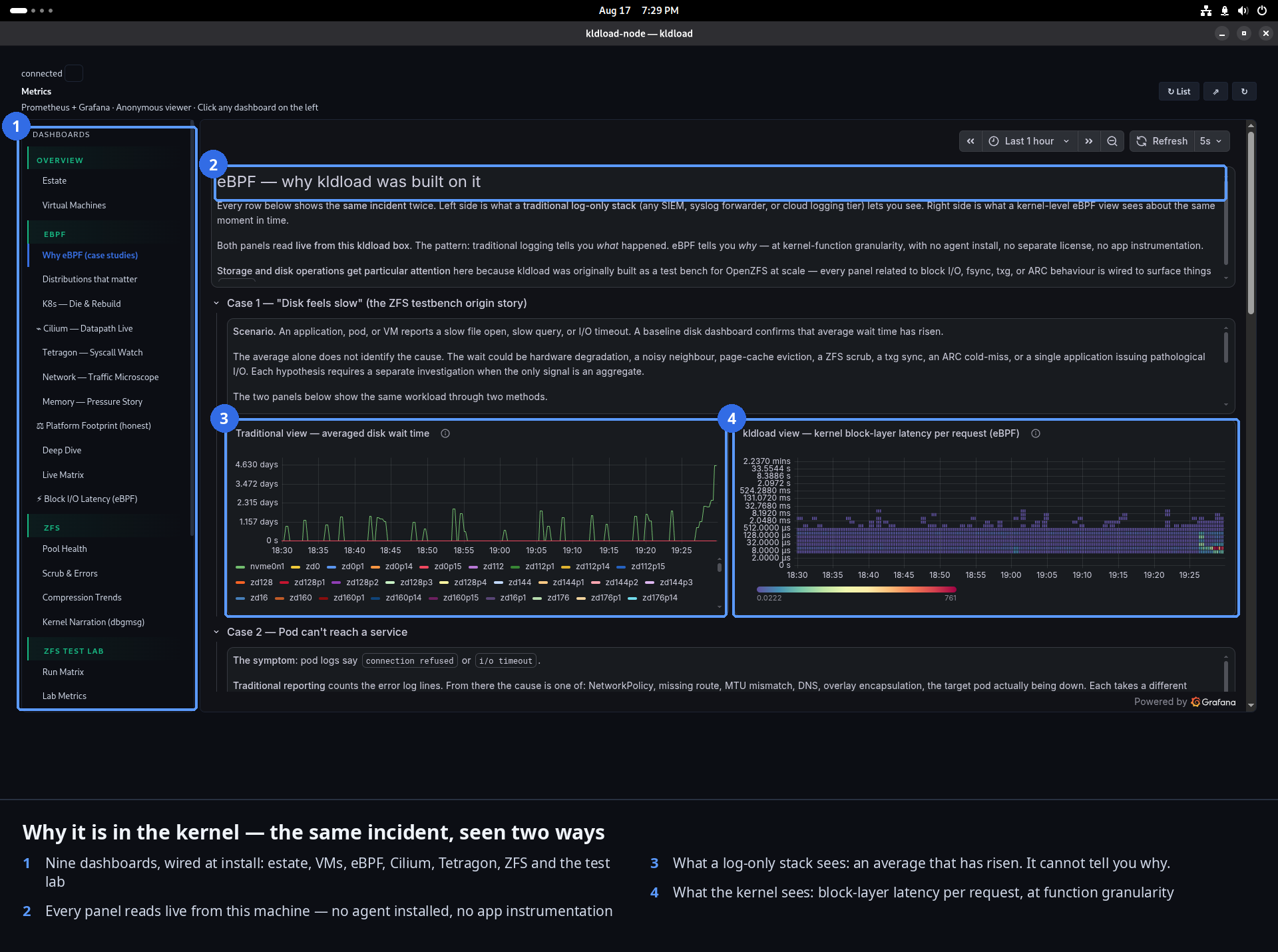
It’s eBPF — tiny, safe programs that run inside the kernel, hooked to any event you name: a syscall, a function, a packet, a disk read. No recompiling, no rebooting, no instrumenting the app. The kernel already sees everything; this is how you finally get to ask.

Here’s the part most developers sleep on. You figure logging and a debugger have you covered — but logging means editing code and shipping again, and a debugger means stopping the process, and only for code you actually own. eBPF does neither. It watches any running program — yours or not — in production, live, at near-zero cost, without changing a thing you’re watching. The print statement, the redeploy-just-to-add-a-log, the “attach and pray” session, the per-host agent and its license — that whole moat, gone.

Suppose nothing could hide from you.

Every process, file, and syscall — live.

See every process the moment it starts, every file it opens, every syscall it makes, with the PID that did it. No agent installed. The kernel was watching; now so are you.

The expensive instrumentation, already resident.

Flame graphs and latency histograms, out of the box.

biolatency, tcplife, execsnoop, zfsdist — the tracing most teams pay a vendor for, sitting in a terminal, on the modern kernel, from first boot.

Observability that assembles itself.

The stack is up before you log in.

Prometheus, Grafana, Loki — wired and drawing graphs from the first boot. Dashboards populate themselves as things start. Nothing to wire, nothing to buy.

Intrusions caught at the instant they occur.

Catch the escape as it happens.

Tetragon flags the privilege grab, the unexpected exec, the container escape — in the kernel, live, with the full process lineage. Not a log you read tomorrow.

An on-box intelligence that reads the whole machine.

A local model that acts on what it sees.

Bob runs on your GPU, offline, and can drive the same panels, trace the same kernel, and stand up the same environments — on request. No API key, nothing leaving the box.

The GPU that randomly hangs?

See what the driver won’t tell you.

A flaky i915 on old hardware, a power gremlin you can’t reproduce — no logs, nothing to strace, and drm.debug just floods you and shifts the timing so the bug hides. Point bcc-tools at it and the invisible turns into a live trace: every runtime-PM transition, every wakeref, every stall. Impossible-to-debug becomes plain and boring.

Trusted before you even log in.
The whole world is assembled in the kernel at second zero — and verified, from power-on, that it’s the world you signed.

That anxious window every Linux box used to have — six seconds of services scrambling up, an init race, no guarantee the kernel that booted is the one you meant? Gone. No half-booted wild west to attack, no unsigned module slipping in, no antivirus theater bolted on to compensate. The machine is verified from the first instruction and fully assembled before a user even exists. The whole insecure-boot era just… ends.

Remember the wild-west boot window?

The world is built before you log in.

No six seconds of services scrambling up in an insecure half-state. The mesh, the storage, the whole substrate are live in the kernel at second zero — SSH can bind to the encrypted network before a user even exists. There’s no window left to attack, and userland becomes something you add, not something you wait on.

Is the kernel you booted the one you trust?

The running kernel is the allowed kernel.

Secure Boot and a TPM verify that the code running is the code you signed — the trusted-from-power-on model Windows and Mac have had for decades. With native Secure Boot support built in, that guarantee is finally easy on Linux, on every distro.

Point it at any public repo.
dnf, apt, pacman — you’re not choosing a distro off a menu, you’re configuring any public repository you like, and the same powers ride on top of it unchanged. RHEL, Debian, Ubuntu, Fedora, Arch — the ones we include are just a starting point to get you going.

The whole culture around which distro? Mostly obsolete. The precious “pet” server you nurse through in-place upgrades for years has been a proven disaster for decades. You don’t migrate between versions — that’s a fool’s errand — you clone the box, provision the new one fresh, and cut over, because ZFS makes any install portable in ways you don’t normally think about. The migration guide, the upgrade dread, the distro tribalism — gone. Linux was always meant to arrive fresh each major release. Treat it that way.

RHEL, Debian, and Arch, rendered interchangeable.

One set of tools. Any repo.

The same commands do the same thing whether you pull from dnf, apt, or pacman. Switch the base distro and nothing you learned stops working.

The vendor’s distro, left entirely intact.

Nothing removed. Everything added.

Your apt, dnf, pacman, zfs, virsh, kubectl all work directly, exactly as upstream ships them. kldload only adds — it never replaces.

Install went sideways? Take it back.

Snapshot, then install.

Every install snapshots first. The new package breaks something? Undo the whole transaction — the system, not just the package. Still just your package manager underneath.

One image, honored by every hypervisor.

Build once, deploy everywhere.

Export any install to qcow2, VMDK, VHD, OVA, or raw — ZFS, mesh, and eBPF already baked in. Feed it to Packer, run it on any cloud or hypervisor, and nothing else in your stack changes.

No internet? No problem. None.

The whole thing works air-gapped.

Every package is mirrored inside the image. Install and run with the network unplugged — the USB is the repo, the recovery, and the air gap, all at once.

A sixteen-node fleet, conjured from one stick.

Unattended, from a single USB.

One answer file, one stick, sixteen machines on an encrypted mesh with shared storage — provisioned while you get coffee. The examples are a starting point; the ceiling is yours.

Rent the metal. Own the estate.

Your invisible network, on anyone’s cloud.

Run on a provider’s raw compute and block storage — then lay your own encrypted mesh, ZFS, and eBPF over the top. Their managed networking, gateways, and “services” go optional; you manage your estate and pay only for what makes sense. ZFS, WireGuard, eBPF, NVIDIA — assembled in a few keystrokes.

The 2 a.m. stuff, made boring.
The boring operational reality that used to need a runbook, a spreadsheet, and a team.

That 2 a.m. binder is obsolete. The dead-disk fire drill, the “restore from backup and pray,” the four-hour rebuild, the maintenance window scheduled weeks out. The disk dies and the pool never stops serving; the update breaks and you pick yesterday at the boot menu. What used to be a bad night and a longer morning becomes a shrug and a snapshot. The runbook, the war room, the dread — gone.

Dead drive? Swap it, walk away.

Walk in, swap it, walk out.

A drive fails — you get an email, not an outage, because the pool never stopped serving. The machine tells you exactly which disk, by serial and slot (stick a QR code on the tray and it’s a phone-scan away). Slot in a new one, one command, and it rebuilds itself in the background while you get on with your day.

Disaster recovery you can put in your pocket.

The USB stick is the whole plan.

Lose the building, the region, the machine — plug the stick into anything, and every kernel module needed to read your data is already on it. The recovery, the install, and the air gap are the same object on a shelf.

Do something reckless. Then un-do it.

Snapshot, break it, undo it.

Snapshot, do the scary upgrade, and if it goes sideways it’s like it never happened. Clone the whole server to test first and throw the clone away after — it cost you nothing.

It’s all one machine…

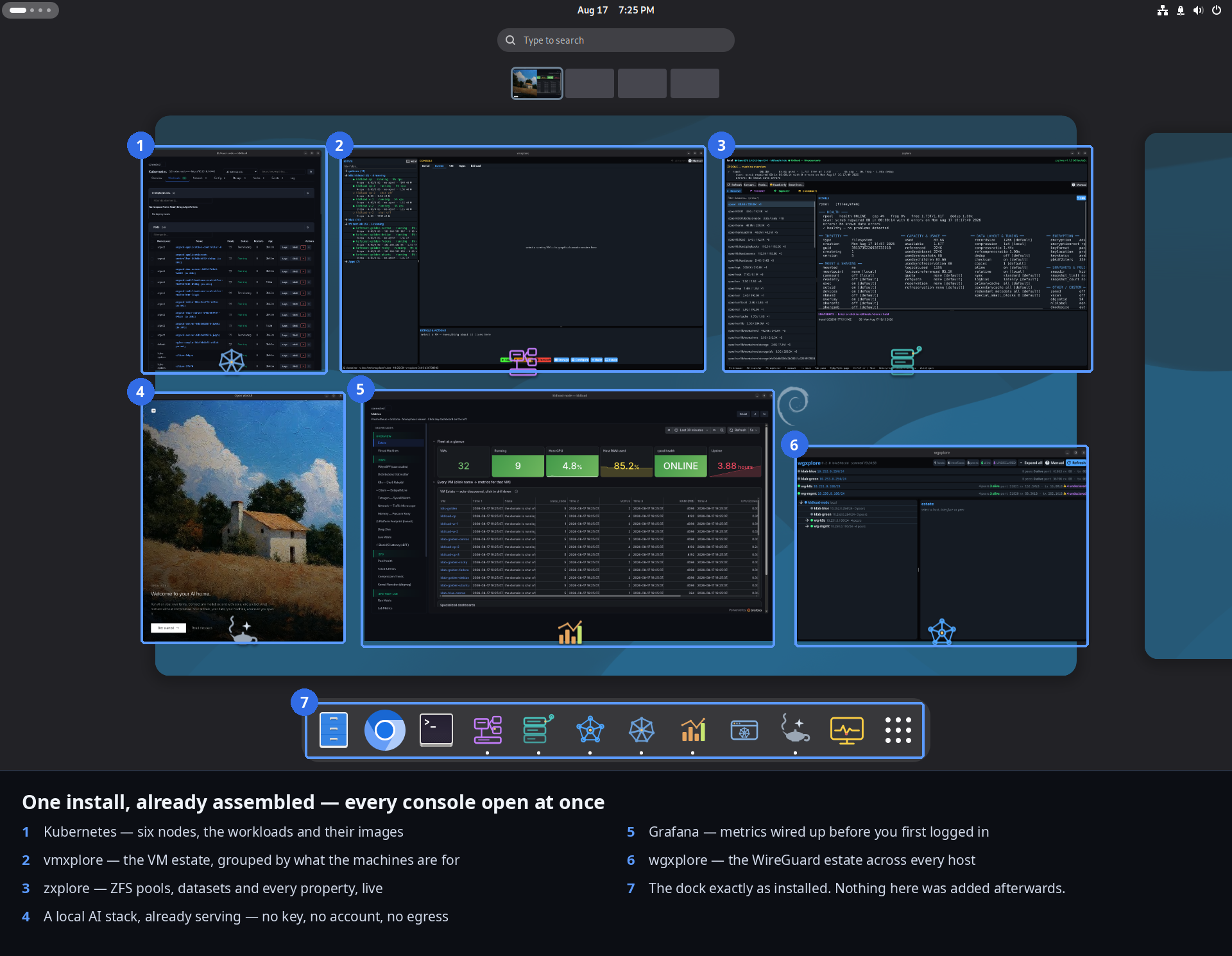
The pile of machines you thought you needed? Gone. The separate dev box, the server in the closet, the cloud account you spun up just to try a cluster, the second rig for the GPU. One box on your desk runs the VMs, the cluster, the AI, and the live tracing — and then you play a game on it. The datacenter and the workstation quietly stopped being different computers.

Snapshot it, spawn twenty, throw them away.

Clones like candy.

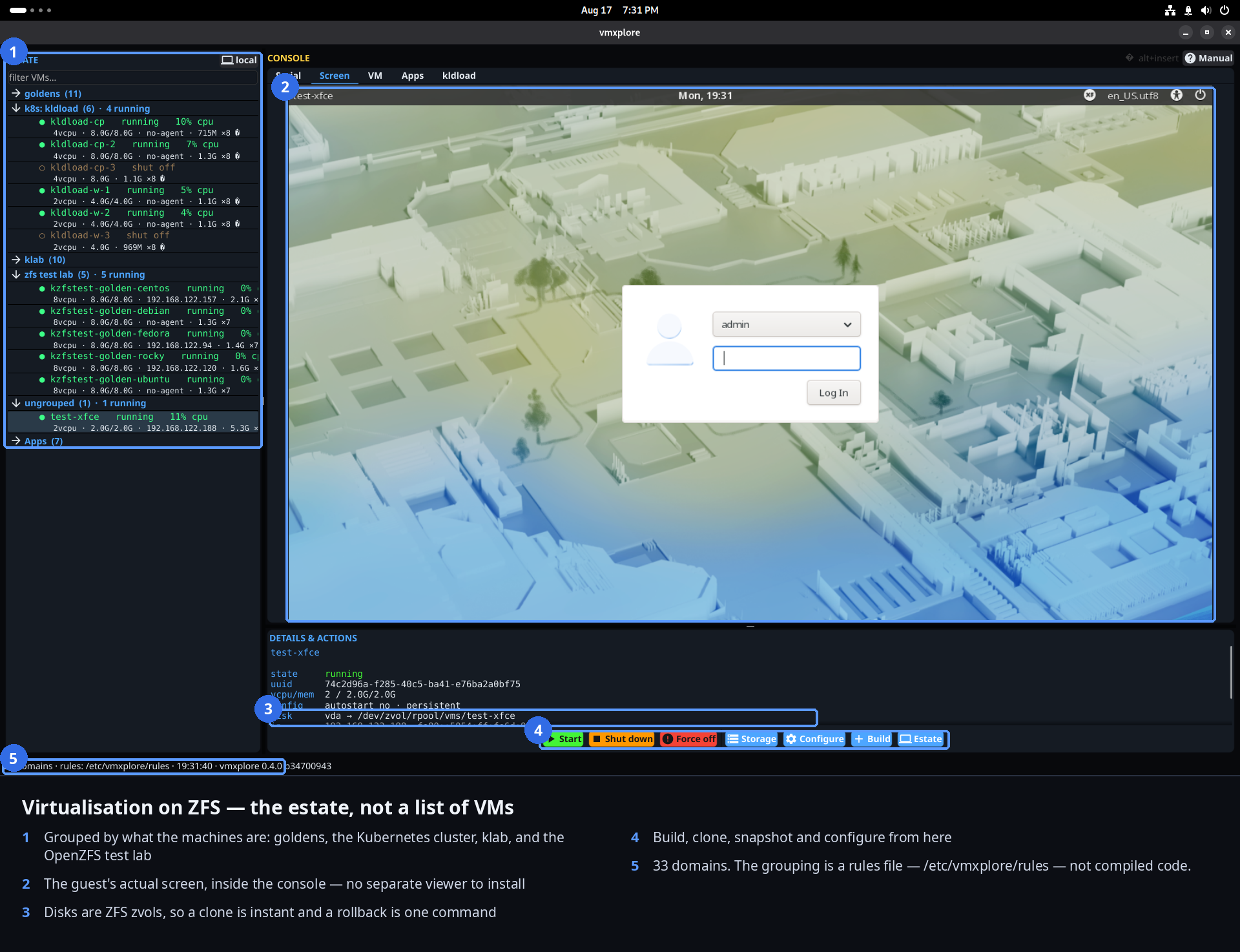
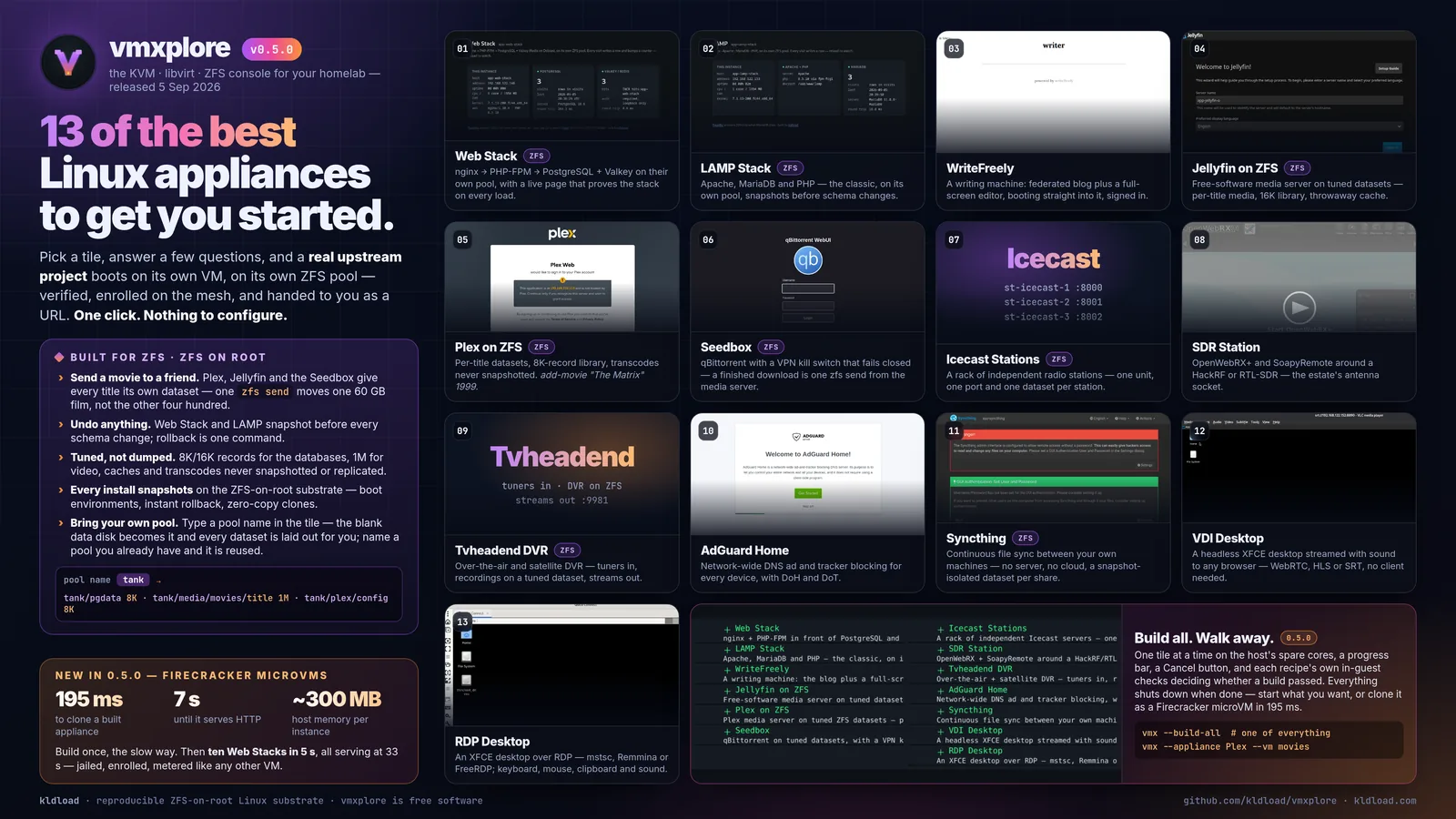
Build the golden image once — that part’s a real deploy, real minutes, packages and all. After that, every copy is a ZFS clone: a metadata op, ~80 ms, zero bytes until it diverges. Point, shoot, and twenty environments spawn into action in seconds. Snapshot a running one, replicate it across the mesh, toss the lot when you’re done. Pew pew pew.

A datacenter that also frags.

A datacenter you can game on.

Steam’s installed and the GPU is shared across your AI, your VMs, and your games. Finish the deploy, launch Counter-Strike. No “NVIDIA on Linux” horror story — it just came with it.

Not installing a distro — authoring one.

Build and deploy any distro.

Not a distro you download and run — a distro you build, from scratch, reproducibly, with the modules you choose. CentOS, Debian, Fedora, Arch, your own — same gesture, air-gapped, yours.

The best ideas, without the baggage.
You know these tools. Here’s where a kernel-loaded machine lands — pets become cattle, and the middleware simply isn’t there.

The part where you had to choose one thing over another? Also obsolete. NixOS’s determinism but the paradigm shift; Proxmox’s VMs but the wait; Talos’s immutability but “I still want real Linux” — you stop trading one for another. Take the best idea from each, and the middleware, the lock-in, and the compromise that came attached are gone.

NixOS-grade determinism, minus the second language.

Declarative, built the normal way.

Deterministic, rebuildable images — assembled with the ordinary tooling you already know: plain post-install scripts, Anaconda/Kickstart, git, and the public dnf/apt/pacman repos. No new language, no new world to learn first. The power, scoped to one rack instead of the entire cage.

Immutable like Talos, alive like Linux.

Immutable at deploy. Mutable in life.

Deterministic and rebuildable like an appliance OS — but the running system is a normal, full Linux, held steady by only a few version pins. Destroy it and replace it at will. Cattle, not pets.

80 ms here. Thirty to ninety in the appliance.

No middleware. None.

Proxmox runs on ZFS too — same engine underneath. The whole difference is the userland tax: its appliance layer turns a clone into a 30–90 second orchestration, when the actual work is a single ZFS metadata op in the kernel — ~80 ms. No partitions to carve, no volume manager, no format translators, no software copying bytes. Just pure, raw ZFS on tap.

Tailscale’s idea, minus the daemon and the middleman.

The mesh is in the kernel, not a userland process.

Tailscale wraps WireGuard in a Go daemon (tailscaled) that phones a coordination service and a relay fleet to stitch your nodes together — that’s what buys the turnkey magic. Here the same WireGuard lives in the kernel: no daemon, no external control plane, no one else’s gateways — and it’s live at second zero of boot, before a user exists. You trade zero-effort onboarding for something you fully own: your keys, your one reachable endpoint, your mesh, on your hardware.

qcow2, VMDK, the whole “yuck” — poof.

The “yuck” dissolves.

Docker, Podman, VMs, disk images, translators — when everything is a dataset, the layers you used to stack just aren’t there. Nothing to convert, nothing to mount, nothing in the way.

A filesystem that is the entire platform.

100+ properties on every dataset.

OpenZFS isn’t a filesystem you bolt features onto — it’s a fully-contained enterprise storage platform. Compression, encryption, quotas, checksums, record size, snapshots, replication — over a hundred tunables, per dataset, inherited and overridable.

Remember when reporting was hard — a six-figure project and a vendor to run it? Then Grafana showed up, and now anyone’s up and running in a second, for free. That tide always comes: what was once hard and rented becomes easy and included. It just came for storage, networking, observability, and identity — all at once, in the kernel.

The whole idea

None of this is new. These powers have been in the kernel for years. The vendors just decided which ones you’re allowed to use, stamped a name brand on each, fragmented the rest, and mailed you the invoice. You don’t want one network card — you want fifty. They want to sell you “Enterprise Networking.”

Kernel-loaded images make the gatekeeper vanish. Every power, combined and un-gated — handed to anyone, for free, regardless of budget or badge. The kernel was always this powerful. Someone just had to stop selling it back to you.

In IaC terms

Your infrastructure-as-code stack assumes a machine that already boots, already has storage, already has a network. It never ships one — you assemble that by hand, every time. That’s layer 0, and it’s the layer everyone skips.

layer 3  ·  Ansible  —  configuration management
layer 2  ·  Terraform  —  provisioning
layer 1  ·  Packer  —  image building
layer 0  ·  kldload  —  the bootable substrate  ← you are here

At layer 0 there’s nothing to configure — it’s constant and deterministic by default. The tool just assembles Linux kernels, and it happens to default to four powers: ZFS, WireGuard, eBPF, NVIDIA. Point them at a setup you already run and those superpowers get granted to it — or build anything you can imagine, directly onto a kernel you can boot reliably. Enjoy — for free.

The verdict

Strip away every demo and it comes down to one freedom: build your own Linux distribution — with whatever kernel modules you want — easily. Any distro, any modules, imbued into an image you own and can deploy anywhere. You’re not installing a distro. You’re building any distro. Yours.

The distros we include are just examples to get you going. And now — after the desktop release — this isn’t a lab experiment or an enterprise contract. It’s a free download, for anyone, everyone. 4fr33.

There’s no rocket science in the code. You don’t install a kernel-loaded OS — you build it, package by package or from source, onto a filesystem on a stick that boots off FAT, the format UEFI still mandates. The only genuinely hard part was preserving the exact order it all has to be assembled in, because out of sequence it doesn’t boot. Proven parts, in the one order that works — and the desktop release turns that hard-won sequence into push-button images. In a perfect world you never see any of it: it sits invisibly behind your ordinary workloads, asking for nothing, and hands you total visibility into every one of them. Invisible where it should be, transparent where it counts. And since that substrate sits quietly underneath — open to inspect, out of your way — there’s no ceiling on what you put over it: literally anything you want, built as your own completely custom Linux and natively deployable from this one tool.

"18.6 exabytes ought to be enough for anybody."

— someone, right before they needed 18.7

"I asked for a filesystem and it gave me a datacenter."

— a homelabber, mildly alarmed

"We benchmarked it against our backup vendor. The vendor lost — turns out snapshots don’t send invoices."

— a suspiciously happy SRE

"My cluster came up before my coffee. I have complicated feelings about this."

— a platform engineer
↓ Download ISO Source on GitHub Discord

Build and deploy any distro:

CentOS 10Debian 13Ubuntu 24.04Fedora 44RHEL 10Rocky 10ArchFreeBSD

Where it runs. These images are built for real hardware — GPU, display, physical NICs, Secure Boot and TPM — which is rather the point: a kernel-loaded desktop or server is a bare-metal platform. Running in a VM instead? The core and server profiles are tuned for exactly that. On bare metal, take your pick — and enjoy.

This page is the idea. Every technical detail behind it — the how, the commands, the internals — lives in the docs. BSD-3-Clause. No phone home, no telemetry, no SaaS backend. Every config is one cat away on GitHub. Why bash? Because the whole system is just configuration, build scripts, and containers — automated in one simple, auditable, universal format. Nothing exotic to trust, nothing you can’t read.